Human-in-the-Loop AI Agent
Last updated Jan 20, 2026
This example demonstrates how to build an AI agent that requires human approval; we use Temporal Signals to bring that user input into the agent.
Overview
The workflow implements the agent flow:
- Uses an LLM to analyze a user request and propose an action.
- If the proposed action is deemed risky, pauses and waits for human approval via Temporal Signal
- Executes the action if auto-approved (if not risky) or human approved, or cancels if rejected/timed out
Key features:
- Resource efficient waiting: Can wait for approval for hours, days or indefinitely; while waiting, the agent consumes no compute resources.
- Signal-based approval: External systems send approval decisions via Temporal Signals
- Durable timers: Time limits placed on human int he loop steps survive any execution distruptions.
- Complete audit trail: All decisions are logged for compliance
Prerequisites
- Python 3.11+
- Temporal server running locally
- OpenAI API key
Setup
- Install dependencies:
uv sync
- Set your OpenAI API key:
export OPENAI_API_KEY='your-api-key-here'
- Start Temporal Dev Server:
temporal server start-dev
Running
Start the Worker
In one terminal:
uv run python -m worker
Start a Workflow
In another terminal:
uv run python -m start_workflow "Delete all test data from the production database"
The workflow will start, analyze the request, and pause for approval. Watch the worker output for instructions.
Send Approval Decision
The worker output will show the workflow ID and request ID. In another terminal, run the send_approval script to approve or reject:
To approve:
uv run python -m send_approval <workflow-id> <request-id> approve "Looks good"
To reject:
uv run python -m send_approval <workflow-id> <request-id> reject "Too risky"
Testing Timeout
To test timeout behavior, simply don't send any approval signal. After 5 minutes (default), the workflow will automatically complete with a timeout result.
Architecture
- Models (
models/models.py): Data structures for workflow input, approval requests and decisions - Activities:
openai_responses.py: Generic LLM invocation activityexecute_action.py: Executes approved actions- The "execution" of approved actions in this sample simply logs messages.
- In a realistic scenario, a set of tools will have been provided to the LLM and the result might be a recommended tool call. In this case, if approved, the agent would invoke the tool via an activity. See the agentic loop with tool calling for guidance on how to use dynamic activities, allowing the tools to be loosely coupled from the agent implementation.
notify_approval_needed.py: Notifies external systems of approval requests- In this sample the notification comes in the form of messages printed in the terminal running the worker.
- In a realistic scenario, the notification activity may send emails, deliver messages to slack, etc.
- Workflow (
workflows/human_in_the_loop_workflow.py): Orchestrates the approval process - Scripts:
worker.py: Runs the Temporal workerstart_workflow.py: Starts workflow executionsend_approval.py: Helper script to send approval signals
Key Patterns
We use a Temporal signal to inject information from the human into the waiting workflow. The signal is delivered from some UI (in this case the send_approval.py script) that uses a Temporal client to deliver the data.
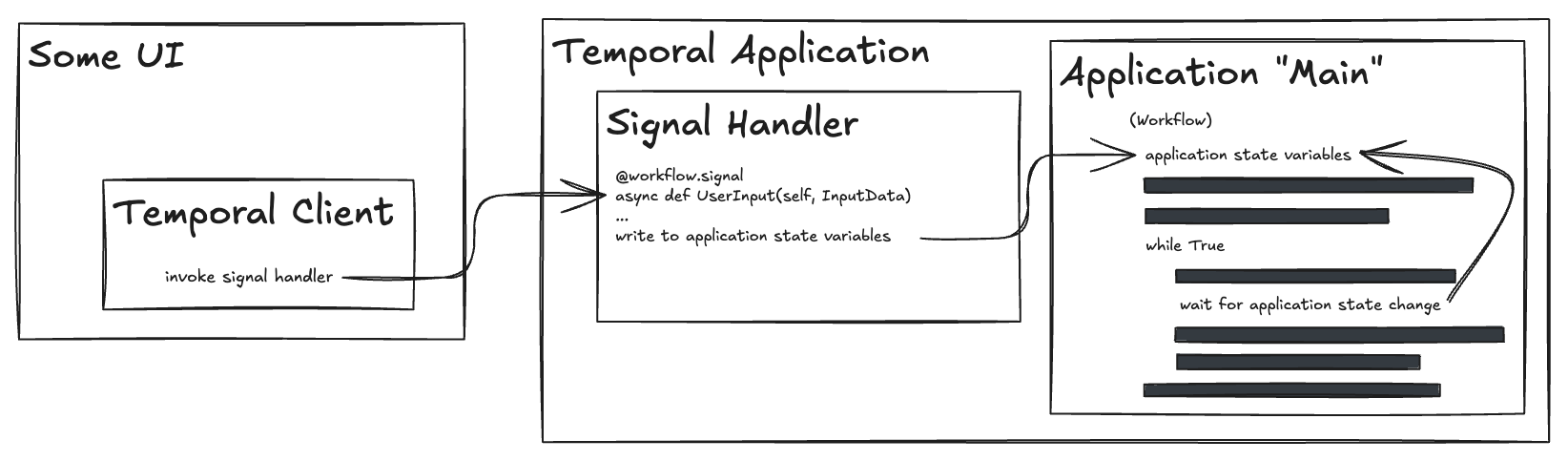
Within the agent implementation there are three main elements to the solution.
Local state within the workflow implementation
This state will be written to via the signal handler and will be part of the condition that defines the wait point.
@workflow.defn
class HumanInTheLoopWorkflow:
    def __init__(self):
        self.current_decision: Optional[ApprovalDecision] = None
        self.pending_request_id: Optional[str] = None
Signal Handler
The workflow uses a signal handler to receive approval decisions asynchronously:
@workflow.signal
async def approval_decision(self, decision: ApprovalDecision):
    if decision.request_id == self.pending_request_id:
        self.approval_decision = decision
    ...
Waiting with Timeout
The workflow waits for approval with a configurable timeout:
await workflow.wait_condition(
    lambda: self.approval_decision is not None,
    timeout=timedelta(seconds=timeout_seconds),
)
Extensions
This pattern can be extended to support:
- Multiple approvers with voting
- Escalation workflows
- Conditional approval based on action risk
- Integration with Slack, email, or custom UIs
- Query handlers to check approval status